
Most businesses don’t have a traffic problem. They have a lead problem. People land on the website, scroll for ten seconds and leave without calling, filling a form or sending a WhatsApp message. Google Ads can fix a big part of that, because it puts your offer in front of people who are already searching for what you sell. This post explains how Google Ads help in lead generation, where campaigns usually go wrong, and what to fix first.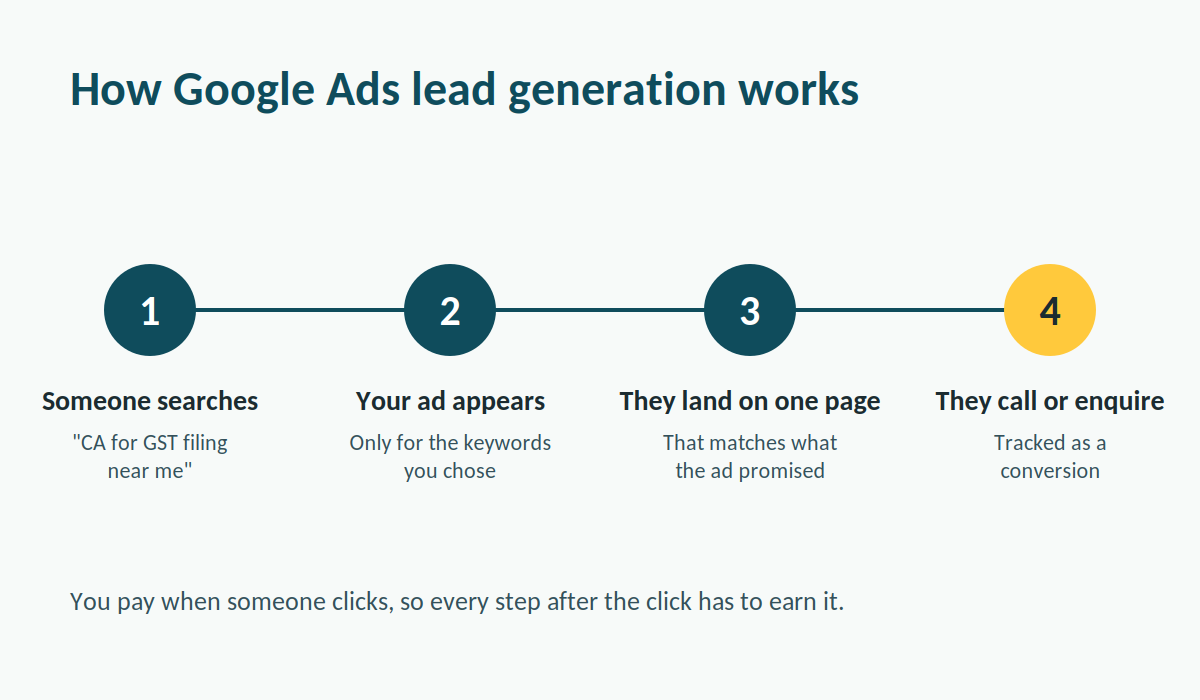
Why Google Ads work: people are already searching
Social media ads interrupt people. Someone is watching reels, and your ad shows up between two videos. Search ads work the other way round. A person types “GST registration consultant” or “dentist for root canal” because they need it now, and your ad appears on that page. That difference in intent is the main reason lead generation through search works so well. You aren’t trying to create interest from nothing. You’re showing up at the moment someone has already decided they need help, and all you have to do is look like the right choice. You also pay only when someone clicks. Impressions are free, so a weak headline costs you very little until people start clicking on it. That’s a good reason to test copy early and often.
Google Ads lead generation starts with the right keywords
Keywords decide who sees your ad, so most of the result is settled here. Not every keyword is worth
buying, though.
Compare two searches: “what is income tax audit” and “CA for income tax audit near me”. The first
person is probably a student or someone curious. The second person is ready to hire. If your goal is
leads, the second kind of search should get most of your budget.
Match types matter too. Broad match casts a wide net and can send your ad to searches that have
nothing to do with your service. Phrase and exact match keep things tighter. Then there are negative
keywords, which are searches you tell Google to ignore. Words like “free”, “jobs”, “course” or
“salary” usually bring clicks that never turn into enquiries. Check the search terms report every week
and add new negatives as you find them. It’s boring work, and it saves a surprising amount of
money.
Targeting in Google Ads: reach the right people, not everyone
A good keyword list can still waste money if the wrong people see the ad. The platform gives you a
few controls that fix this.
Location is the first one. A local clinic doesn’t need clicks from another state, so you can limit ads to a
city or a radius around your office. Ad scheduling is the second. If nobody picks up the phone after 8
1pm, there’s little point paying for calls at 10 pm. Device settings help too, especially if your landing
page works better on mobile than on desktop, or the other way round.
Then there’s remarketing, which the platform now labels “your data” segments. Most visitors don’t
enquire the first time. Remarketing shows your ad again to people who already visited your site,
which keeps you in front of someone who was interested but got distracted. For services with a
longer decision cycle, like financial planning or B2B software, this often brings back leads you’d
otherwise lose.
Ad copy and assets that help Google Ads convert
Your ad has a few lines to work with, so each one has to earn its space. Put the keyword in the
headline, say what makes you different, and tell people what to do next. “Free 15-minute
consultation” is stronger than “Contact us today” because it’s specific and it lowers the risk of taking
the first step.
Assets add more to the ad without extra cost per line. Call assets put a phone number in the ad so
mobile users can ring you with one tap. Sitelinks send people to specific pages such as pricing or a
particular service. Lead form assets let people submit their details inside Google without visiting
your site at all, which works well when your landing page is slow or weak. Expect lower quality leads
from forms, though, since filling one takes almost no effort. Call them quickly and you’ll find out
which ones are real.
Landing pages decide whether Google Ads leads become enquiries
You can pay for the perfect click and still lose it on the landing page. This is where a lot of campaigns
fall apart, and it’s rarely the ad’s fault.
A good landing page does one thing. If the ad promised a GST filing service, the page should be
about GST filing, with a clear headline, a short explanation, proof that you’re credible, and one form
or button. Sending traffic to your homepage is the classic mistake. The visitor has to hunt for what
they came for, and most won’t bother.
Speed matters as well. If the page takes more than a few seconds to load on a mobile connection,
people leave before they see anything. Keep the form short. Name, phone number and one question
is often enough. Every extra field costs you a few leads.
Tracking Google Ads results so you can cut what isn’t working
Without conversion tracking, you’re guessing. Set up tracking for form submissions, phone calls and
WhatsApp clicks before you spend anything serious. Then you can see which keywords, ads and
locations produce enquiries and which just produce clicks.
The number to watch is cost per lead, not cost per click. A keyword with an expensive click can still
be your cheapest source of leads if it converts well, and a cheap click that never converts is
expensive whatever the price says. Look at Quality Score too. It’s Google’s rating of how relevant
2your ad, keyword and landing page are to each other. Google treats it as a diagnostic rather than a
ranking input, so use it to spot weak ads or landing pages instead of chasing the number.
Give campaigns time before changing them. Two days of data rarely says much. Review weekly,
change one thing at a time, and note what you changed so you can trace the effect.
Common Google Ads mistakes that quietly kill leads
Most of the problems we see repeat from account to account:
• Running broad match with no negative keywords, so budget disappears on irrelevant searches.
• Sending every ad to the homepage.
• Judging campaigns by clicks or impressions instead of enquiries.
• Not answering calls or form fills fast. A lead who enquired at 11 am and hears back at 6 pm has
usually called someone else.
• Editing campaigns daily, which resets learning and makes results impossible to read.
Fixing even two of these often improves results more than raising the budget does.
Is Google Ads right for your business?
It works best when people search for what you sell, when a customer is worth enough to justify
paying for a click, and when you can follow up on leads quickly. Lawyers, CAs, clinics, coaching
institutes, real estate agents and local service businesses fit that description. Products nobody
searches for yet are harder, and you may need other channels to build awareness first.
Budget is the usual worry. There’s no fixed number that works for everyone, since cost per click
depends on your industry and location. Start with an amount you can afford to lose while you learn,
track every enquiry, and increase spend only on campaigns that are already producing leads.
If you’d rather not learn this the expensive way, an agency that manages Google Ads day to day can
set up tracking, build tighter campaigns and catch wasted spend early. Get in touch with our team
for a free audit of your current Google Ads account, or a plan for a new one.